1.背景
Apollo是携程开源的服务注册发现平台, 公司开发和测试代码, 也由本地以及springCloud迁往apollo平台, 我负责测试自动化项目的迁移, 计划是把敏感数据先加密后再上传gitlab, 比如仅组内使用的sql账号以及专门线上测试账号等, 开发项目比较统一, 能上apollo的配置都上, 也不需要额外加密.
2.实现分析
Apollo配置中心设计 (apolloconfig.com) 官网介绍地址
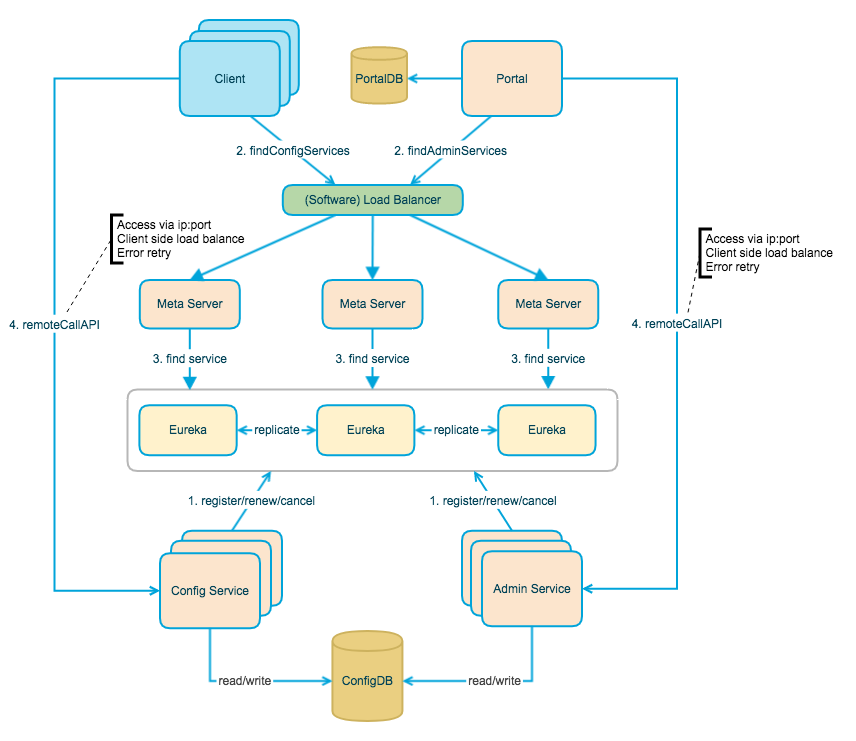
具体的apollo底层原理暂不展开讨论, 主要说下在实际项目中的使用方法, 正好测试项目是非spring类型, 开发项目是springBoot, 分别有不同的实现满足使用, 具体如下
3.非spring的java项目
-
定义SPI文件路径和引用:
resource/META-INFO/app.properties
1
app.id=capp-smoke-test
-
定义各环境配置
apollo-env.properties
1
2
3
4
5
6
dev.meta=https://apollo-configservice-dev.sit.xxxx.cn
fat.meta=https://apollo-configservice.sit.xxxx.cn
lpt.meta=
uat.meta=https://apollo-configservice.uat.xxxx.cn
tools.meta=https://apollo-configservice-prep.xxxx.cn
pro.meta=https://apollo-configservice.xxxx.cn
-
全局配置文件
1
2
3
4
5
6
7
8
9
10
11
12
13
14
15
16
17
18
19
20
21
22
23
24
25
26
27
28
29
30
31
32
33
34
35
36
37
38
39
40
41
42
43
44
45
46
47
48
49
50
51
52
53
54
55
56
57
58
59
60
61
62
63
64
65
66
67
68
69
70
71
72
73
74
75
76
77
78
79
80
81
82
83
84
**
 * 从apollo数据中心读取配置信息
 * @Author graham
 * @Date 2020.10.30
 */
public class ApolloSettings {

    /**
     * 多环境apollo meta server,通过静态系统变量自动匹配并配置
     * SPI自动关联apollo-env.properties文件
     * @Link https://github.com/ctripcorp/apollo/blob/master/apollo-core/src/main/java/com/ctrip/framework/apollo/core/enums/Env.java
     */
    static void environmentSetting(){
        String environment = ProjectSettings.getInstance().getProperty("Environment").toLowerCase();

        switch (environment) {
            case "001":
                environment = "uat";
                break;
            case "009":
                //apollo official no sit statement。So use FAT: Feature Acceptance Test environment
                environment = "fat";
                break;
            case "prod":
                environment = "pro";
                try {
                    Properties properties = new Properties();
                    properties.load(ApolloSettings.class.getResourceAsStream("/apollo-env.properties"));
                    // prod环境通过meta server地址自动发现的config service不可用,怀疑prod环境apollo配置做了单独设置,
                    // 故需要跳过meta server服务发现步骤,直接配置系统全局config service地址,目前该地址和meta server地址一致
                    System.setProperty("apollo.configService", properties.getProperty("pro.meta"));
                } catch (IOException e) {
                    System.out.println("加载apollo-env.properties文件失败!");
                }
                break;
        }
        System.setProperty("env", environment);
    }

    /**
     * 获取数据库账户密码所有配置
     * @return
     */
    public static Properties dbConfgEntity() {
        String dbNamespace = "app.api-test.db-cfg";
        return apolloEntity(dbNamespace);
    }

    /**
     * 获取测试账号所有配置
     * @return
     */
    public static Properties accountConfgEntity() {
        String accountNamespace = "app.api-test.account-common";
        return apolloEntity(accountNamespace);
    }

    /**
     * 获取类型
     * @return
     */
    public static Properties campaignSubtype() {
        String accountNamespace = "app.api-test.subtype";
        return apolloEntity(accountNamespace);
    }

    /**
     * 获取apollo实例并返回namespace全部Key:Value
     * @param namespace
     * @return
     */
    private static Properties apolloEntity(String namespace){
        environmentSetting();
        Config config = ConfigService.getConfig(namespace);
        Properties properties = new Properties();

        for (String keyName : config.getPropertyNames()) {
            properties.setProperty(keyName, config.getProperty(keyName, "DefaultValueNull"));
        }

        System.out.println("加载apollo配置中心数据完成!");
        return properties;
    }
}
-
使用示例
1
ApolloSettings.accountConfgEntity().getProperty("androidVersion")
4.springBoot项目
-
定义SPI文件路径和引用:
resource/META-INFO/app.properties
1
app.id=capp-smoke-test
-
bootstrap.yaml
```yaml spring: application: name: capp-smoke-test cloud: config: enabled: false
apollo: meta: https://apollo-configservice.${ENVIRONMENT}.homecreditcfc.cn bootstrap: enabled: true namespaces: xxxx
spring: profiles: sit
apollo: meta: https://apollo-configservice.sit.xxxx.cn
spring: profiles: prod
apollo: meta: https://apollo-configservice.xxxx.cn
1
2
3
4
5
6
7
8


3. 使用注解引用

   ```java
       @Value("${xxx.xxxx.page.enabled}")
       private Boolean maintenanceFlag;